
How to build your first AI agent (no-code)
The most important "stand out" skill in 2026

You can’t walk into a tech company in 2026, without hearing the phrase “AI Agent”.
If you want to level up your impact at work this year, you should consider building AI Agents. It could it be an agent to help you be more efficient at your work (like a productivity assistant of sorts), or an agent that you deploy into production (e.g. a customer-facing agent). Both are good options.
Or if you are applying for Data Analyst or Data Science job, and want to stand out from your competition? A strong working knowledge of AI agents can help you do that.
So in today’s article, I’ll share the steps (and tips!) on how to build your first AI Agent. I am going to build a no-code version of an agent today in n8n. But, if you want to see a version in Python, just let me know in the comments.
First, let’s get on the same page.. What is an AI agent?
An AI Agent is an autonomous assistant that receives high-level goal, breaks that down into steps, and then execute on those steps to hit the goal. Unlike a workflow, where you define the steps that the AI takes, a AI Agent decides for itself how it’s going to approach a problem.
Every AI Agent has 4 components:
The prompt: these are the instructions that states the goal, and includes detailed instructions
The LLM: this is the brain (the thinking machine) of the entire system. It could be an open-sourced model or a frontier model. My favorites are the Claude and OpenAI models.
Memory: this allows the LLM to remember what steps it’s taken, and use that history and output to determine the next steps
Tools: this are like modularized functions that allows to the AI agent to take actions. These actions could be retrieving information from a database, connecting hangs to a document, or sending messages.
Let’s get into building your first AI agent
Our first AI agent is going to be a very small and simple Data Analyst agent. As mentioned earlier, I’m going to build it in n8n, which is a no-code automation software. I recommend using n8n for building your first AI agent because it’s visual, intuitive and already has many tools built out.
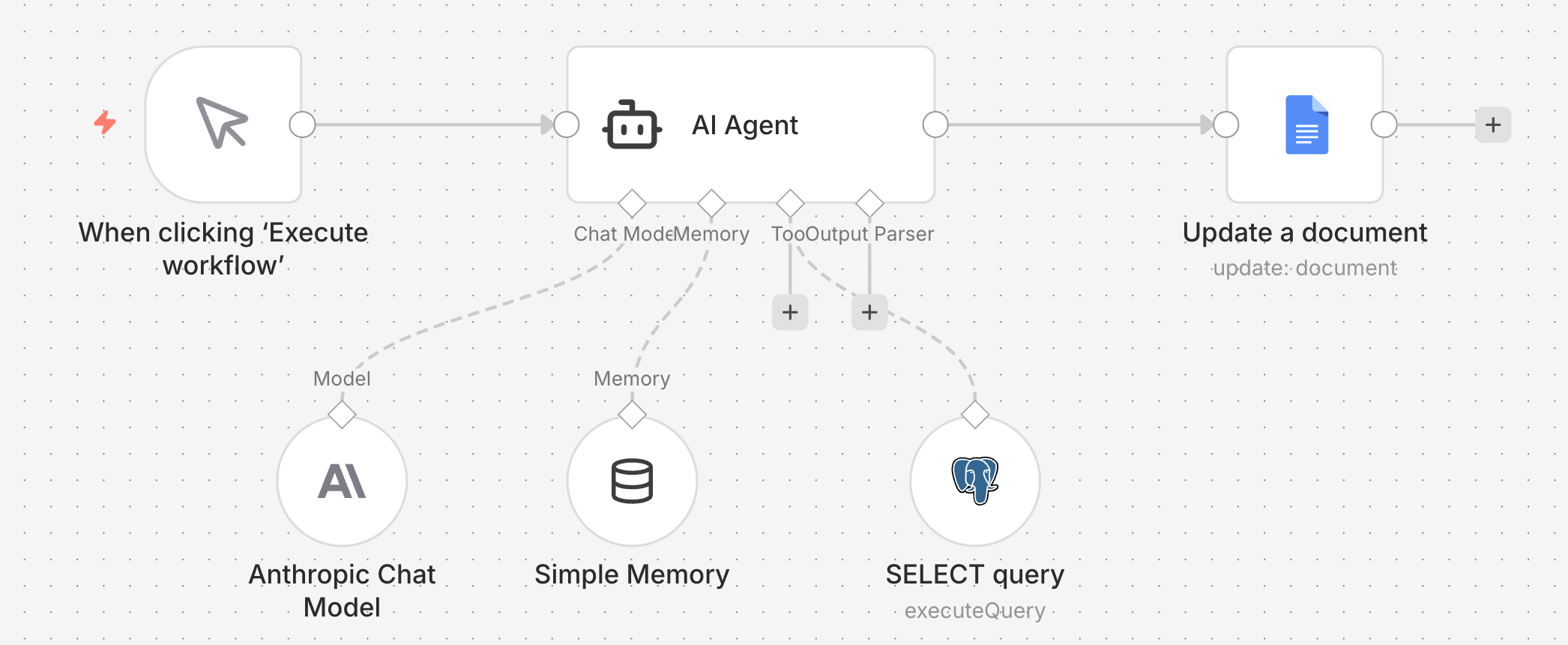
This is the n8n Data Analyst agent that we’re building. It might look like a stupidly simple agent, but it’s powerful and it forms the foundation for more complex agents.
The most important standout skill in 2026
You can’t walk into a tech company in 2026, without hearing the phrase “AI Agent”.
If you want to level up your impact at work this year, you should consider building AI Agents. It could it be an agent to help you be more efficient at your work (like a productivity assistant of sorts), or an agent that you deploy into production (e.g. a customer-facing agent). Both are good options.
Or if you are applying for Data Analyst or Data Science job, and want to stand out from your competition? A strong working knowledge of AI agents can help you do that.
So in today’s article, I’ll share the steps (and tips!) on how to build your first AI Agent. I am going to build a no-code version of an agent today in n8n. But, if you want to see a version in Python, just let me know in the comments.
First, let’s get on the same page.. What is an AI agent?
An AI Agent is an autonomous assistant that receives high-level goal, breaks that down into steps, and then execute on those steps to hit the goal. Unlike a workflow, where you define the steps that the AI takes, a AI Agent decides for itself how it’s going to approach a problem.
Every AI Agent has 4 components:
The prompt: these are the instructions that states the goal, and includes detailed instructions
The LLM: this is the brain (the thinking machine) of the entire system. It could be an open-sourced model or a frontier model. My favorites are the Claude and OpenAI models.
Memory: this allows the LLM to remember what steps it’s taken, and use that history and output to determine the next steps
Tools: this are like modularized functions that allows to the AI agent to take actions. These actions could be retrieving information from a database, connecting hangs to a document, or sending messages.
Let’s get into building your first AI agent
Our first AI agent is going to be a very small and simple Data Analyst agent. As mentioned earlier, I’m going to build it in n8n, which is a no-code automation software. I recommend using n8n for building your first AI agent because it’s visual, intuitive and already has many tools built out.
This is the n8n Data Analyst agent that we’re building. It might look like a stupidly simple agent, but it’s powerful and it forms the foundation for more complex agents.
A hot tip for your first AI Agent:
Start small. AI Agents can be large, complex systems, but don’t start there. Instead try to scope down your first AI Agent to be the simplest version of your solution. Ideally, an agent that only requires one tool. (The one we are building today only has 1 tool: a SQL query tool.)
I promise you, you can build your agent out to be more complex later on. But build and test a small agent first.
Let’s break this down into the components, starting with the prompt.
Btw, I’ve saved my n8n AI agent workflow here. You can import this directly into n8n and see every detail of how I built out this agent.
The prompt is a good place to start building your agent, because it forces you to think through what you want the agent to do, and what tools you want to give the agent.
In n8n, you’ll select the “AI Agent” node and add the prompt into the parameters.
Every good prompt has 4 parts:
A goal. This is what you want the AI agent to accomplish; in our example we want it to complete an Exploratory Data Analysis on the relationship between social media and mental health.
The instructions; use this opportunity to provide details on how you want the Agent to approach the task. I personally like to do this in a bullet list, and if the bullet list gets too long, I’ll organize it into sections.
A list of tools and what to use them for, so the agent knows what actions it can take.
Detailed context on the business, users and request. Any additional data can also be inputted here.
The second component: the brain
This is the LLM model that the AI agent will use for reasoning and executing. You can add an LLM to your AI agent in n8n by clicking on Chat Model.
n8n is already integrated with many frontier models, like Gemini, Grok, Anthropic, OpenAI etc, so it is really to plug an LLM model into your AI agent. All you need to do is grab an API key from the respective platforms and get started.
In my example, I’m using Anthropic’s Haiku 4.5 model. I chose this because it’s a cheap, fast, and consistently / accurately calls tools.
However, right now n8n is giving out free OpenAI credits, so you could just use those free credits while getting started.
Pro-tip: use a small, cheap model, like Claude Haiku 4.5 or GPT 4.1 mini, while you are building and testing your workflows. These LLM calls add up quick, so you don’t want to be spending unnecessary money on the development phase.
The third component: memory
I kept this piece super simple. We only need a simple memory for simple AI agent design. Our AI agent simply has to remember what steps it’s taken and the findings from each of those steps - within each workflow.
However, if we need more permanent storage of the conversation, we might consider adding a Postgres or Redis chat memory.
The last and most important component(s): tools
Recall, tools are like modularized functions that allows the AI agent to take actions, particularly with external platforms.
n8n already has many pre-built tool integrations for your AI agent, like a Gmail tool, and Google Sheets tool, API call tools and a PostgreSQL query tool. I recommend that for you AI agent, you use pre-built tool… just makes it easier to get started!
In our example, I am giving the AI agent free reign to decide what kind of SELECT queries it wants to run on a specific table. You can see how I set this up by downloading my n8n json workflow. We can be more strict with our tool design (specifying exactly what types of queries the agent can call) or more lenient (allowing the agent full freedom across the entire database).
But I went with my design of any SELECT query on a table because it was
Low risk: the agent can only read from the database and not write into it
Scoped down: the agent only has to explore 1 data table, instead of the entire database
Possible improvements to this AI agent
If I were to build this agent out a little more, I might give my agent an email or a Google Docs tool, so that the Agent can write down and share out its findings.
Or we might have a Python charting tool, that can create charts and graphs to complement the SQL queries and analysis.
Or maybe we’ll make the prompt more generic, so this agent can do Exploratory Data Analyses on any dataset and data question. Woah, hold up this is getting pretty crazy!
That’s the power of AI agents though. You can start small and slowly build up from there. The limit to what AI agents can do is your imagination.. and your willingness to slowly build, iterate, and test.
See you in the next one!
—
Want to give your models, analyses and AI agents the power of data across the internet?
Use Oxylabs’ WebScraper API to scrape data from the web, both ethically and reliably.
Oxylabs’ Webscraper API also
✔️Automates actions (eg. clicks, scrolls) to streamline scraping
✔️Javascript rendering for accurate scrapings from websites
✔️Only charges you for successful results
✔️Has built-in CAPTCHA bypassing
You can even scrape up to 2K results for free → https://oxylabs.go2cloud.org/aff_c?offer_id=7&aff_id=1644&url_id=174
—
ICYMI (in case you missed it)
A short video of this (yes, this exact one) AI agent
Building a Monte Carlo simulation in Python
LLM parameters you must know
How to scrape data from the web
How to ace Data Science case study interviews
A hot tip for your first AI Agent:
Start small. AI Agents can be large, complex systems, but don’t start there. Instead try to scope down your first AI Agent to be the simplest version of your solution. Ideally, an agent that only requires one tool. (The one we are building today only has 1 tool: a SQL query tool.)
I promise you, you can build your agent out to be more complex later on. But build and test a small agent first.
Let’s break this down into the components, starting with the prompt.
Btw, I’ve saved my n8n AI agent workflow here. You can import this directly into n8n and see every detail of how I built out this agent.
The prompt is a good place to start building your agent, because it forces you to think through what you want the agent to do, and what tools you want to give the agent.
In n8n, you’ll select the “AI Agent” node and add the prompt into the parameters.
Every good prompt has 4 parts:
A goal. This is what you want the AI agent to accomplish; in our example we want it to complete an Exploratory Data Analysis on the relationship between social media and mental health.
The instructions; use this opportunity to provide details on how you want the Agent to approach the task. I personally like to do this in a bullet list, and if the bullet list gets too long, I’ll organize it into sections.
A list of tools and what to use them for, so the agent knows what actions it can take.
Detailed context on the business, users and request. Any additional data can also be inputted here.
The second component: the brain
This is the LLM model that the AI agent will use for reasoning and executing. You can add an LLM to your AI agent in n8n by clicking on Chat Model.
n8n is already integrated with many frontier models, like Gemini, Grok, Anthropic, OpenAI etc, so it is really to plug an LLM model into your AI agent. All you need to do is grab an API key from the respective platforms and get started.
In my example, I’m using Anthropic’s Haiku 4.5 model. I chose this because it’s a cheap, fast, and consistently / accurately calls tools.
However, right now n8n is giving out free OpenAI credits, so you could just use those free credits while getting started.
Pro-tip: use a small, cheap model, like Claude Haiku 4.5 or GPT 4.1 mini, while you are building and testing your workflows. These LLM calls add up quick, so you don’t want to be spending unnecessary money on the development phase.
The third component: memory
I kept this piece super simple. We only need a simple memory for simple AI agent design. Our AI agent simply has to remember what steps it’s taken and the findings from each of those steps - within each workflow.
However, if we need more permanent storage of the conversation, we might consider adding a Postgres or Redis chat memory.
The last and most important component(s): tools
Recall, tools are like modularized functions that allows the AI agent to take actions, particularly with external platforms.
n8n already has many pre-built tool integrations for your AI agent, like a Gmail tool, and Google Sheets tool, API call tools and a PostgreSQL query tool. I recommend that for you AI agent, you use pre-built tool… just makes it easier to get started!
In our example, I am giving the AI agent free reign to decide what kind of SELECT queries it wants to run on a specific table. You can see how I set this up by downloading my n8n json workflow. We can be more strict with our tool design (specifying exactly what types of queries the agent can call) or more lenient (allowing the agent full freedom across the entire database).
But I went with my design of any SELECT query on a table because it was
Low risk: the agent can only read from the database and not write into it
Scoped down: the agent only has to explore 1 data table, instead of the entire database
Possible improvements to this AI agent
If I were to build this agent out a little more, I might give my agent an email or a Google Docs tool, so that the Agent can write down and share out its findings.
Or we might have a Python charting tool, that can create charts and graphs to complement the SQL queries and analysis.
Or maybe we’ll make the prompt more generic, so this agent can do Exploratory Data Analyses on any dataset and data question. Woah, hold up this is getting pretty crazy!
That’s the power of AI agents though. You can start small and slowly build up from there. The limit to what AI agents can do is your imagination.. and your willingness to slowly build, iterate, and test.
See you in the next one!
—
Want to give your models, analyses and AI agents the power of data across the internet?
Use Oxylabs’ WebScraper API to scrape data from the web, both ethically and reliably.
Oxylabs’ Webscraper API also:
Automates actions (eg. clicks, scrolls) to streamline scraping
Javascript rendering for accurate scrapings from websites
Only charges you for successful results
Has built-in CAPTCHA bypassing
You can even scrape up to 2K results for free → https://oxylabs.go2cloud.org/aff_c?offer_id=7&aff_id=1644&url_id=174
—
ICYMI (in case you missed it)
A short video of this (yes, this exact one) AI agent
Building a Monte Carlo simulation in Python
LLM parameters you must know
How to scrape data from the web
How to ace Data Science case study interviews